Table of Contents
Introduction
It is recommended that you first review the Hello World - Unidirectional Transmitter and Receiver example. Transceivers are a combined entity of the Transmitter and Receiver objects therefore understanding these concepts is a prerequisite.
The following example demonstrates two different basic applications integrated with the LISNR Radius Android SDK.
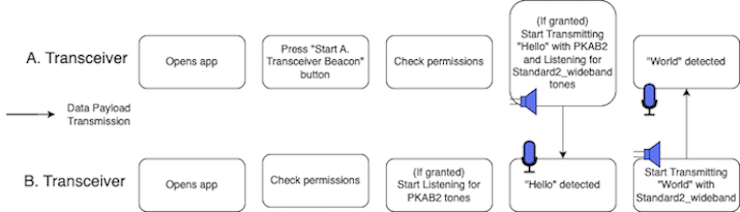
One application uses A. Transceiver to repeatedly beacon the string "Hello" to the second application upon pressing a button in the app. The second application will contain a listening B. Transceiver which will respond by broadcasting the string "World" once it detects the "Hello" tone from A. Transceiver.
A. Transceiver and B. Transceiver functionality are separated into two different applications and should be run on two separate devices. Below is a diagram of the expected data flow.
In this example, you will learn to:
- Create a Radius Object
- A. Transceiver Application
- B. Transceiver Application
- Shutdown Radius
- Re-Running the Transceiver Apps
Estimated time to complete and run the example is between 5-15 minutes per application depending on level of Android development experience.
Setup
Before writing any code using the Radius SDK, you will first need to set up your basic Android application and UI/UX. Follow the instructions in the Setup section with the following changes:
For A. Transceiver Application
- (Step 6.) Name the file (ex. HelloWorldActivity.java) and give it the following contents:
- Note: Replace the
SDK_TOKENwith an SDK Token from the LISNR Portal. The SDK token must be created with the same Android Application ID as this application (ex. com.example.helloworld). Your Android Application ID is located in the app level build.gradle file. - Note: Android Studio may indicate there are some errors within this file. These should be resolved when all steps are complete. package com.example.helloworld;import android.Manifest;import android.app.AlertDialog;import android.content.DialogInterface;import android.content.pm.PackageManager;import android.os.Bundle;import android.util.Log;import android.view.View;import android.widget.Button;import android.widget.TextView;import androidx.activity.result.ActivityResultLauncher;import androidx.activity.result.contract.ActivityResultContracts;import androidx.appcompat.app.AppCompatActivity;import androidx.core.content.ContextCompat;import com.lisnr.radius.Radius; //import Radius classimport com.lisnr.radius.Tone; //import Tone classimport com.lisnr.radius.Transceiver; //import Transceiver classimport com.lisnr.radius.exceptions.AudioSystemException; //import exceptionsimport com.lisnr.radius.exceptions.AuthorizationDeniedException;import com.lisnr.radius.exceptions.BeaconNotPermittedException;import com.lisnr.radius.exceptions.InvalidArgumentException;import com.lisnr.radius.exceptions.InvalidProfileException;import com.lisnr.radius.exceptions.InvalidTokenException;import com.lisnr.radius.exceptions.InvalidTonePayloadException;import com.lisnr.radius.exceptions.RadiusDestroyedException;import com.lisnr.radius.exceptions.TransceiverNotRegisteredException;public class HelloWorldActivity extends AppCompatActivity {private Radius mRadius;private String mSdkToken = "SDK_TOKEN";private Radius.ErrorEventCallback mRadiusErrorCallback;private Transceiver.TransceiverCallback aTransceiverCallback;private Transceiver aTransceiver;private Tone aTransceiverTone;private String payloadStringATransceiver = "Hello";private String payloadStringBTransceiver = "World";private Button startATransceiverTransmitRepeatBtn;private String tagHelloWorld = "HelloWorldExample";private TextView mPermissionsDeniedTextView;private String aTransceiverReceivedPayloadString = "";private TextView aTransceiverReceivedPayloadContents;private ActivityResultLauncher<String> requestPermissionLauncher =registerForActivityResult(new ActivityResultContracts.RequestPermission(), isGranted -> {if (isGranted) {//Register the Transceiver Object to the Radius Object if permissions are grantedregisterTransceiverStartReceiving();} else {//Change the UI if permissions are denied and receiving is not possiblepermissionDeniedUI();}});@Overrideprotected void onCreate(Bundle savedInstanceState) {super.onCreate(savedInstanceState);setContentView(R.layout.hello_world_activity);}@Overrideprotected void onPause() {super.onPause();try {mRadius.unregisterAll();} catch (RadiusDestroyedException e) {Log.e(tagHelloWorld, "Radius unregisterAll error - " + e.getMessage());}mRadius.shutdown();startATransceiverTransmitRepeatBtn.setEnabled(true); //reenable for re-runsaTransceiverReceivedPayloadContents.setText(""); //clear out value for re-runs}@Overrideprotected void onResume() {super.onResume();mPermissionsDeniedTextView = findViewById(R.id.permissionsDeniedTextView);startATransceiverTransmitRepeatBtn = findViewById(R.id.startATransceiverBeaconBtn);aTransceiverReceivedPayloadContents = findViewById(R.id.aTransceiverReceivedPayloadTextView);//Create a Radius Error CallbackmRadiusErrorCallback = new Radius.ErrorEventCallback() {@Overridepublic void onUnauthorizedCallback(String s) {Log.e(tagHelloWorld, "Radius onAuthorized - " + s);}@Overridepublic void onExceptionCallback(String s) {Log.e(tagHelloWorld, "Radius onException - " + s);}};//Create a Radius Objecttry {mRadius = new Radius(getApplicationContext(), mSdkToken, mRadiusErrorCallback);} catch (AudioSystemException | InvalidTokenException | AuthorizationDeniedException e) {Log.e(tagHelloWorld, "Radius Creation Error - " + e.getMessage());}//Create A. Transceiver CallbackaTransceiverCallback = new Transceiver.TransceiverCallback() {@Overridepublic void onTransceiverTransmitComplete(Transceiver transceiver, Tone tone) {runOnUiThread(new Runnable() {@Overridepublic void run() {startATransceiverTransmitRepeatBtn.setEnabled(false);}});}@Overridepublic void onTransceiverEmpty(Transceiver transceiver) {Log.d(tagHelloWorld, "Transceiver onTransceiverEmpty");}@Overridepublic void onTransceiverToneReceived(Transceiver transceiver, Tone tone) {aTransceiverReceivedPayloadString = payloadBytesToString(tone.getData());//Validate that the contents of the received tone are what we expect from B.Transceiver ("World")if (aTransceiverReceivedPayloadString.equals(payloadStringBTransceiver)) {//Stop Transmitting/Listening with A. Transceiver - the data flow is complete once we've received the response from B. Transceivertry {mRadius.unregisterTransceiver(aTransceiver);} catch (InvalidArgumentException | RadiusDestroyedException e) {Log.e(tagHelloWorld, "Radius Unregister Transceiver Error - " + e.getMessage());}}//display the received payload ("World")runOnUiThread(new Runnable() {@Overridepublic void run() {aTransceiverReceivedPayloadContents.setText(aTransceiverReceivedPayloadString);}});}};//Create A. Transceiver Objecttry {aTransceiver = new Transceiver(Transceiver.TransceiverType.PKAB_SEND_STANDARD_WIDEBAND_RECEIVE, aTransceiverCallback);} catch (InvalidProfileException e) {Log.e(tagHelloWorld, "Transceiver Creation Error - " + e.getMessage());}//Create "Hello" Tone Object for A. TransceiveraTransceiverTone = new Tone(payloadStringATransceiver.getBytes());startATransceiverTransmitRepeatBtn.setOnClickListener(new View.OnClickListener() {@Overridepublic void onClick(View view) {checkPermissions();//Start transmitting repeatedly (beaconing) with A. Transceivertry {aTransceiver.beacon(aTransceiverTone);} catch (InvalidTonePayloadException | TransceiverNotRegisteredException |BeaconNotPermittedException e) {Log.e(tagHelloWorld, "Radius Transceiver beacon - " + e.getMessage());}}});}private void checkPermissions() {if (ContextCompat.checkSelfPermission(getApplicationContext(), android.Manifest.permission.RECORD_AUDIO) ==PackageManager.PERMISSION_GRANTED) {//Register the Transceiver Object to the Radius Object if permissions are grantedregisterTransceiverStartReceiving();} else if (shouldShowRequestPermissionRationale(android.Manifest.permission.RECORD_AUDIO)) {AlertDialog.Builder builder = new AlertDialog.Builder(HelloWorldActivity.this);builder.setTitle("Microphone Permissions").setMessage("In a moment the Hello World App will request permission to access your microphone. " +"Microphone access is used only to listen for high-frequency data tones. Your data is only processed locally on this device. At no time will audio be recorded. " +"If you do not grant the permissions, the receiving functionality of this app will be disabled.").setNegativeButton("CANCEL", new DialogInterface.OnClickListener() {@Overridepublic void onClick(DialogInterface dialogInterface, int i) {dialogInterface.dismiss();}}).setPositiveButton("OK", new DialogInterface.OnClickListener() {@Overridepublic void onClick(DialogInterface dialog, int which) {requestPermissionLauncher.launch(Manifest.permission.RECORD_AUDIO);}});builder.create().show();} else {requestPermissionLauncher.launch(Manifest.permission.RECORD_AUDIO);}}private void permissionDeniedUI() {//Disable the A. Transceiver start beacon button if permissions are deniedstartATransceiverTransmitRepeatBtn.setEnabled(false);mPermissionsDeniedTextView.setVisibility(View.VISIBLE);}//Register A. Transceiver and start listening for Tones from B. Transceiverprivate void registerTransceiverStartReceiving() {startATransceiverTransmitRepeatBtn.setEnabled(true);mPermissionsDeniedTextView.setVisibility(View.GONE);//Register the A. Transceiver Object to the Radius Objecttry {mRadius.registerTransceiver(aTransceiver);} catch (InvalidArgumentException | RadiusDestroyedException e) {Log.e(tagHelloWorld, "Radius Transceiver Register Error - " + e.getMessage());}}private String payloadBytesToString(byte[] data) {StringBuilder dataString = new StringBuilder();for (int byteOffset = 0; byteOffset < data.length; byteOffset++) {byte dataNybbleLow = (byte) (data[byteOffset] & 0x0F);byte dataNybbleHigh = (byte) ((data[byteOffset] & 0xF0) >> 4);dataString.append(nybbleToChar(dataNybbleHigh));dataString.append(nybbleToChar(dataNybbleLow));// Spaces for readabilitydataString.append(" ");}final String[] strSplit = dataString.toString().split(" ");dataString = new StringBuilder();for (final String str : strSplit){final char chr = (char) Integer.parseInt(str, 16);if (chr < 0x20 || chr > 0x7E) {// Display non-printable ASCII as a unicode ?dataString.append('\uFFFD');} else {dataString.append(chr);}}return dataString.toString();}private char nybbleToChar(byte data) {char dataChar;if(data <= 9) {dataChar = (char)('0' + data);}else {dataChar = (char)('A' + data - 0x0A);}return dataChar;}}
- Note: Replace the
- (Step 9.) Name the new file (ex. hello_world_activity.xml) and give it the following contents: <?xml version="1.0" encoding="utf-8"?><androidx.constraintlayout.widget.ConstraintLayout xmlns:android="http://schemas.android.com/apk/res/android"android:layout_width="match_parent"android:layout_height="match_parent"xmlns:app="http://schemas.android.com/apk/res-auto"><TextViewandroid:id="@+id/aTransceiverTextView"android:layout_width="wrap_content"android:layout_height="wrap_content"android:layout_marginTop="10dp"android:text="A. Transceiver"android:textSize="15sp"android:textStyle="bold"app:layout_constraintTop_toTopOf="parent"app:layout_constraintStart_toStartOf="parent"app:layout_constraintEnd_toEndOf="parent" /><TextViewandroid:id="@+id/aTransceiverReceivedPayloadLabel"android:layout_width="wrap_content"android:layout_height="wrap_content"android:layout_marginTop="10dp"android:textSize="15sp"android:text="Received Payload: "app:layout_constraintTop_toBottomOf="@id/aTransceiverTextView"app:layout_constraintStart_toStartOf="parent"app:layout_constraintEnd_toStartOf="@id/aTransceiverReceivedPayloadTextView"app:layout_constraintHorizontal_chainStyle="packed"/><TextViewandroid:id="@+id/aTransceiverReceivedPayloadTextView"android:layout_width="wrap_content"android:layout_height="wrap_content"android:layout_marginTop="10dp"android:layout_marginStart="5dp"android:textSize="15sp"app:layout_constraintTop_toBottomOf="@id/aTransceiverTextView"app:layout_constraintStart_toEndOf="@id/aTransceiverReceivedPayloadLabel"app:layout_constraintEnd_toEndOf="parent" /><Buttonandroid:id="@+id/startATransceiverBeaconBtn"android:layout_width="wrap_content"android:layout_height="wrap_content"android:text="Start Repeatedly (Beacon) with A. Transceiver"android:maxLines="3"android:textSize="10sp"android:layout_marginTop="15dp"android:layout_marginEnd="2dp"app:layout_constraintTop_toBottomOf="@id/aTransceiverReceivedPayloadTextView"app:layout_constraintStart_toStartOf="parent"app:layout_constraintEnd_toEndOf="parent"app:layout_constraintHorizontal_chainStyle="packed"/><TextViewandroid:id="@+id/permissionsDeniedTextView"android:layout_width="wrap_content"android:layout_height="wrap_content"android:layout_marginTop="10dp"android:paddingHorizontal="10dp"android:textSize="15sp"android:visibility="gone"android:text="Permissions denied. Please enable them in app setting to use receiving functionality."app:layout_constraintTop_toBottomOf="@id/startATransceiverBeaconBtn"app:layout_constraintStart_toStartOf="parent"app:layout_constraintEnd_toEndOf="parent" /></androidx.constraintlayout.widget.ConstraintLayout>
For B. Transceiver Application
- Note: A new Android Application project should be created at this point. Do not add these files to your initial A. Transceiver Application.
- (Step 6.) Name the file (ex. HelloWorldActivity.java) and give it the following contents:
- Note: Replace the
SDK_TOKENwith an SDK Token from the LISNR Portal. The SDK token must be created with the same Android Application ID as this application (ex. com.example.helloworld). Your Android Application ID is located in the app level build.gradle file. - Note: Android Studio may indicate there are some errors within this file. These should be resolved when all steps are complete. package com.example.helloworld;import android.Manifest;import android.app.AlertDialog;import android.content.DialogInterface;import android.content.pm.PackageManager;import android.os.Bundle;import android.util.Log;import android.view.View;import android.widget.Button;import android.widget.TextView;import androidx.activity.result.ActivityResultLauncher;import androidx.activity.result.contract.ActivityResultContracts;import androidx.appcompat.app.AppCompatActivity;import androidx.core.content.ContextCompat;import com.lisnr.radius.Radius; //import Radius classimport com.lisnr.radius.Tone; //import Tone classimport com.lisnr.radius.Transceiver; //import Transceiver classimport com.lisnr.radius.exceptions.AudioSystemException; //import exceptionsimport com.lisnr.radius.exceptions.AuthorizationDeniedException;import com.lisnr.radius.exceptions.BeaconNotPermittedException;import com.lisnr.radius.exceptions.InvalidArgumentException;import com.lisnr.radius.exceptions.InvalidProfileException;import com.lisnr.radius.exceptions.InvalidTokenException;import com.lisnr.radius.exceptions.InvalidTonePayloadException;import com.lisnr.radius.exceptions.RadiusDestroyedException;import com.lisnr.radius.exceptions.TransceiverNotRegisteredException;public class HelloWorldActivity extends AppCompatActivity {private Radius mRadius;private String mSdkToken = "SDK_TOKEN";private Radius.ErrorEventCallback mRadiusErrorCallback;private Transceiver.TransceiverCallback bTransceiverCallback;private Transceiver bTransceiver;private Tone bTransceiverTone;private String payloadStringATransceiver = "Hello";private String payloadStringBTransceiver = "World";private String tagHelloWorld = "HelloWorldExample";private TextView mPermissionsDeniedTextView;private String bTransceiverReceivedPayloadString = "";private TextView bTransceiverReceivedPayloadContents;private ActivityResultLauncher<String> requestPermissionLauncher =registerForActivityResult(new ActivityResultContracts.RequestPermission(), isGranted -> {if (isGranted) {//Register the Transceiver Object to the Radius Object if permissions are grantedregisterTransceiverStartReceiving();} else {//Change the UI if permissions are denied and receiving is not possiblepermissionDeniedUI();}});@Overrideprotected void onCreate(Bundle savedInstanceState) {super.onCreate(savedInstanceState);setContentView(R.layout.hello_world_activity);}@Overrideprotected void onPause() {super.onPause();try {mRadius.unregisterAll();} catch (RadiusDestroyedException e) {Log.e(tagHelloWorld, "Radius unregisterAll error - " + e.getMessage());}mRadius.shutdown();}@Overrideprotected void onResume() {super.onResume();mPermissionsDeniedTextView = findViewById(R.id.permissionsDeniedTextView);bTransceiverReceivedPayloadContents = findViewById(R.id.bTransceiverReceiverPayloadTextView);bTransceiverReceivedPayloadContents.setText(""); //clear out value for re-runs//Create a Radius Error CallbackmRadiusErrorCallback = new Radius.ErrorEventCallback() {@Overridepublic void onUnauthorizedCallback(String s) {Log.e(tagHelloWorld, "Radius onAuthorized - " + s);}@Overridepublic void onExceptionCallback(String s) {Log.e(tagHelloWorld, "Radius onException - " + s);}};//Create a Radius Objecttry {mRadius = new Radius(getApplicationContext(), mSdkToken, mRadiusErrorCallback);} catch (AudioSystemException | InvalidTokenException | AuthorizationDeniedException e) {Log.e(tagHelloWorld, "Radius Creation Error - " + e.getMessage());}//Create B. Transceiver CallbackbTransceiverCallback = new Transceiver.TransceiverCallback() {@Overridepublic void onTransceiverTransmitComplete(Transceiver transceiver, Tone tone) {Log.d(tagHelloWorld, "Transceiver onTransceiverTransmitComplete");}@Overridepublic void onTransceiverEmpty(Transceiver transceiver) {Log.d(tagHelloWorld, "Transceiver onTransceiverEmpty");}@Overridepublic void onTransceiverToneReceived(Transceiver transceiver, Tone tone) {bTransceiverReceivedPayloadString = payloadBytesToString(tone.getData());//Validate that the contents of the received tone are what we expect from A.Transceiver ("Hello")if (bTransceiverReceivedPayloadString.equals(payloadStringATransceiver)) {//Display the tone string received from A. TransceiverrunOnUiThread(new Runnable() {@Overridepublic void run() {bTransceiverReceivedPayloadContents.setText(bTransceiverReceivedPayloadString);}});//Start beaconing the response ("World") back to A. Transceivertry {bTransceiver.beacon(bTransceiverTone);} catch (TransceiverNotRegisteredException | InvalidTonePayloadException | BeaconNotPermittedException e) {Log.e(tagHelloWorld, "Transceiver Beacon Error - " + e.getMessage());}}}};//Create B. Transceiver Objecttry {bTransceiver = new Transceiver(Transceiver.TransceiverType.STANDARD_WIDEBAND_SEND_PKAB_RECEIVE, bTransceiverCallback);} catch (InvalidProfileException e) {Log.e(tagHelloWorld, "Transceiver Creation Error - " + e.getMessage());}//Create "World" Tone Object for B. TransceiverbTransceiverTone = new Tone(payloadStringBTransceiver.getBytes());checkPermissions();}private void checkPermissions() {if (ContextCompat.checkSelfPermission(getApplicationContext(), android.Manifest.permission.RECORD_AUDIO) ==PackageManager.PERMISSION_GRANTED) {//Register the Transceiver Object to the Radius Object if permissions are grantedregisterTransceiverStartReceiving();} else if (shouldShowRequestPermissionRationale(android.Manifest.permission.RECORD_AUDIO)) {AlertDialog.Builder builder = new AlertDialog.Builder(HelloWorldActivity.this);builder.setTitle("Microphone Permissions").setMessage("In a moment the Hello World App will request permission to access your microphone. " +"Microphone access is used only to listen for high-frequency data tones. Your data is only processed locally on this device. At no time will audio be recorded. " +"If you do not grant the permissions, the receiving functionality of this app will be disabled.").setNegativeButton("CANCEL", new DialogInterface.OnClickListener() {@Overridepublic void onClick(DialogInterface dialogInterface, int i) {dialogInterface.dismiss();}}).setPositiveButton("OK", new DialogInterface.OnClickListener() {@Overridepublic void onClick(DialogInterface dialog, int which) {requestPermissionLauncher.launch(Manifest.permission.RECORD_AUDIO);}});builder.create().show();} else {requestPermissionLauncher.launch(Manifest.permission.RECORD_AUDIO);}}private void permissionDeniedUI() {mPermissionsDeniedTextView.setVisibility(View.VISIBLE);}//Register B. Transceiver and start listening for Tones from A. Transceiverprivate void registerTransceiverStartReceiving() {mPermissionsDeniedTextView.setVisibility(View.GONE);//Register the B. Transceiver Object to the Radius Objecttry {mRadius.registerTransceiver(bTransceiver);} catch (InvalidArgumentException | RadiusDestroyedException e) {Log.e(tagHelloWorld, "Radius Transceiver Register Error - " + e.getMessage());}}private String payloadBytesToString(byte[] data) {StringBuilder dataString = new StringBuilder();for (int byteOffset = 0; byteOffset < data.length; byteOffset++) {byte dataNybbleLow = (byte) (data[byteOffset] & 0x0F);byte dataNybbleHigh = (byte) ((data[byteOffset] & 0xF0) >> 4);dataString.append(nybbleToChar(dataNybbleHigh));dataString.append(nybbleToChar(dataNybbleLow));// Spaces for readabilitydataString.append(" ");}final String[] strSplit = dataString.toString().split(" ");dataString = new StringBuilder();for (final String str : strSplit){final char chr = (char) Integer.parseInt(str, 16);if (chr < 0x20 || chr > 0x7E) {// Display non-printable ASCII as a unicode ?dataString.append('\uFFFD');} else {dataString.append(chr);}}return dataString.toString();}private char nybbleToChar(byte data) {char dataChar;if(data <= 9) {dataChar = (char)('0' + data);}else {dataChar = (char)('A' + data - 0x0A);}return dataChar;}}
- Note: Replace the
- (Step 9.) Name the new file (ex. hello_world_activity.xml) and give it the following contents: <?xml version="1.0" encoding="utf-8"?><androidx.constraintlayout.widget.ConstraintLayout xmlns:android="http://schemas.android.com/apk/res/android"android:layout_width="match_parent"android:layout_height="match_parent"xmlns:app="http://schemas.android.com/apk/res-auto"><TextViewandroid:id="@+id/bTransceiverTextView"android:layout_width="wrap_content"android:layout_height="wrap_content"android:layout_marginTop="30dp"android:text="B. Transceiver"android:textStyle="bold"android:textSize="15sp"app:layout_constraintTop_toTopOf="parent"app:layout_constraintStart_toStartOf="parent"app:layout_constraintEnd_toEndOf="parent" /><TextViewandroid:id="@+id/bTransceiverReceivedPayloadLabel"android:layout_width="wrap_content"android:layout_height="wrap_content"android:layout_marginTop="10dp"android:textSize="15sp"android:text="Received Payload: "app:layout_constraintTop_toBottomOf="@id/bTransceiverTextView"app:layout_constraintStart_toStartOf="parent"app:layout_constraintEnd_toStartOf="@id/bTransceiverReceiverPayloadTextView"app:layout_constraintHorizontal_chainStyle="packed"/><TextViewandroid:id="@+id/bTransceiverReceiverPayloadTextView"android:layout_width="wrap_content"android:layout_height="wrap_content"android:layout_marginTop="10dp"android:layout_marginStart="5dp"android:textSize="15sp"app:layout_constraintTop_toBottomOf="@id/bTransceiverTextView"app:layout_constraintStart_toEndOf="@id/bTransceiverReceivedPayloadLabel"app:layout_constraintEnd_toEndOf="parent" /><TextViewandroid:id="@+id/permissionsDeniedTextView"android:layout_width="wrap_content"android:layout_height="wrap_content"android:layout_marginTop="10dp"android:paddingHorizontal="10dp"android:textSize="15sp"android:visibility="gone"android:text="Permissions denied. Please enable them in app setting to use receiving functionality."app:layout_constraintTop_toBottomOf="@id/bTransceiverReceiverPayloadTextView"app:layout_constraintStart_toStartOf="parent"app:layout_constraintEnd_toEndOf="parent" /></androidx.constraintlayout.widget.ConstraintLayout>
- At this point, you now have the ability to run all of the functionality of these examples within the two separate Android devices running each application (A. Transceiver Application and B. Transceiver Application).
The following sections show in detail the particular lines of code that are responsible for each aspect of the example application that you created in the setup steps.
Create a Radius Object
Before any transceiving functionality can happen, a Radius object must be created. A Radius object manages all instances of Transceiver objects in your application. There should only be one Radius object in each of your applications.
In the code snippet below, SDK_TOKEN will need to be replaced with a valid Radius SDK Token from the LISNR Portal. When creating your SDK token in the LISNR Portal, be sure to input the Android Application ID (found in app level build.gradle file) of the Hello World project.
Notice that the Radius constructor we utilize in this example does not take a Lifecycle object in the constructor. As a result, if a Transceiver, Transmitter, or Receiving is transmitting/receiving actively and the app is moved to the background, the transmitting/receiving will still occur. The Transceiver, Transmitter, Receiver, or Radius objects need to be manually stopped or shutdown in order to stop transmitting/receiving, then will need to be recreated upon coming back into the app. See the Shutdown Radius below to see how to do this.
To see an example of linking the Radius object lifecycle with the application lifecycle so transmitting/receiving stop automatically when the app moves into the background, see the Create a Radius Object with an SDK Token and Radius Callback section.
A. Transceiver Application
Create A. Transceiver Object
In order to have transceiver (simultaneous transmitting and receiving) functionality in the A. Transceiver - Hello World app, we will need to create our first Transceiver with its required parameters. The Transceiver constructor requires a Transceiver Callback and a transceiver type (see Transceiver Types to compare the other types). The Transceiver in this example is created with the PKAB_SEND_STANDARD_WIDEBAND_RECEIVE transceiver type.
Recall that a Transceiver callback is a combination of the Transmitter and Receiver callbacks. The Transceiver callback determines what happens when a tone finishes playing (onTransceiverTransmitComplete), when a repeating beacon has stopped (onTransceiverEmpty), and what happens when a tone is detected from another Transceiver with the opposite transceiver type (onTransceiverToneReceived).
In this example, for A. Transceiver, we will disable the "Start Beacon with A. Transceiver" button in the onTransceiverTransmitComplete callback because we don't want the user to press the button if the A. Transceiver is already beaconing. Logic is added in the onTransceiverToneReceived callback to stop listening and stop beaconing (by unregistering A. Transceiver) once we have detected the response "World" tone from B. Transceiver. It will also display the received payload from B. Transceiver ("World"). You can see in the snippet below, payloadBytesToString is called on the received B. Transceiver's Tone data contents to convert it from byte array to ASCII string. See the Byte Array to ASCII section to see the payloadBytesToString method contents.
Create "Hello" Tone
Create Button to Register A. Transceiver and Beacon "Hello"
Now that the A. Transceiver object has been created, it must be registered to the Radius object that was created earlier in order for the Transceiver to be authenticated and used.
You may notice there is no separate section in this example for how to start listening with a Transceiver. Similar to a Receiver, when a Transceiver is registered to the Radius object, listening begins. To stop listening for incoming Tones, the Transceiver must be unregistered from the Radius object. Microphone permissions are required in order to use a Transceiver in the Radius SDK, this includes transmitting functionality.
This example shows how to perform the steps of checking for microphone permissions, providing context to the user, and then asking the user to grant permissions, before trying to listen/receive Tones with the Radius SDK. It is important that in a real Android application using Radius, to disable any UI/UX that is intended for receiving Tones if the user denies microphone permissions.
In this example, permissions are checked when the user presses the Beacon A. Transceiver Button because we want A. Transceiver to start listening for tones (by registering) from B. Transceiver at the same time that A. Transceiver has started transmitting "Hello". A permission error message will be displayed and the Beacon A. Transceiver Button will be disabled if permissions are not granted because the transmitting functionality will not work without microphone permissions since this is a Transceiver. See Audio Permissions for more details on requesting runtime permissions.
B. Transceiver Application
Create B. Transceiver Object
In order to utilize transceiver (simultaneous transmitting and receiving) functionality, we must have two Transceivers running. We have already set up our first Transceiver in A. Transceiver Application. Now we will create our second Transceiver with its required parameters with the B. Transceiver Application. Note: A. Transceiver Application and B. Transceiver Application should be installed/run on two separate mobile devices.
The B. Transceiver in this example is created with the STANDARD_WIDEBAND_SEND_PKAB_RECEIVE transceiver type. Notice that it is the compatible (opposite send and receive types) transceiver type as the one that A. Transceiver was created with.
In this example in the onTransceiverToneReceived callback, logic is added to display the received payload from A. Transceiver ("Hello") then start beaconing the response tone "World" back to A. Transceiver. You can see in the snippet below, payloadBytesToString is called on the received A. Transceiver's Tone data contents to convert it from byte array to ASCII string. See the Byte Array to ASCII section to see the payloadBytesToString method contents.
Register B. Transceiver
Now that the B. Transceiver object has been created, it must be registered to the Radius object that was created earlier in order for the Transceiver to be authenticated and used.
This example shows how to perform the steps of checking for microphone permissions, providing context to the user, and then asking the user to grant permissions, before trying to listen/receive Tones with the Radius SDK. It is important that in a real Android application using Radius, to disable any UI/UX that is intended for receiving Tones if the user denies microphone permissions.
In this example, permissions are checked as soon as the user enters the screen since we want B. Transceiver to immediately begin listening for tones (by registering) from A. Transceiver. A permission error message will be displayed if permissions are not granted because the transmitting/listening functionality will not work without microphone permissions since this is a Transceiver. See Audio Permissions for more details on requesting runtime permissions.
Create "World" Tone
Shutdown Radius
Since the Radius object in both of these example applications was not created with a lifecycle object in the constructor, we must manually stop active transmitting/receiving or shutdown our Radius object when the app is closed or moved to the background. The example below calls unregisterAll on the Radius object which will unregister all Transceivers, Transmitters, and Receivers. As a result, any active transmitting/receiving will be stopped. The Radius object and the Transceivers will need to be recreated when the app is revisted which is why all of the objects in this example are created in the onResume() method.
Note: This code snippet could also be placed in the onStop() method of the activity. (To learn more about the Android lifecycle, read the documentation: https://developer.android.com/guide/components/activities/activity-lifecycle)
Re-Running the Transceiver Apps
Once you have received "Hello" string on B. Transceiver device running the application and received "World" on A. Transceiver device, you can perform the flow again. Simply exit out of the applications by backgrounding or closing them. Once you return to the application, the "Start Beacon A. Transceiver" button will be re-enabled in the A. Transceiver application and the "Received Payload" string will be cleared out on both apps.