Signal and Quality Indicators to Measure Performance of LISNR Tones
Signal and quality indicators are reported by Tones when detected by a Receiver. These values can be useful in a Radius application to let end users know the result of the received Tone or if physical measures can be taken to improve the results (i.e moving devices closer together).
The following member functions are part of Radius Tone object class when detected by a Receiver:
- com.lisnr.radius.Tone.getSnrDb - Signal-to-Noise Ratio (SNR): Indicates in decibels (dB) the amount of interfering noise relative to the received strength of the LISNR Tone.
- Error Vector Magnitude (EVM): Gives an indication in decibels (dB) of how challenging it was for the LISNR Tone to be received by the LISNR Radius SDK.
- com.lisnr.radius.Tone.getHeaderEvmDb - Header Quality: EVM value indicating the quality of the Header.
- Note: Only reported by PKAB2/PKAB2_wideband Tones
- com.lisnr.radius.Tone.getPayloadEvmDb - Payload Quality: EVM value indicating the quality of the Payload.
- Note: Only reported by PKAB2/PKAB2_wideband Tones
- com.lisnr.radius.Tone.getHeaderEvmDb - Header Quality: EVM value indicating the quality of the Header.
Signal strength and signal quality metrics will be provided with one of the following indicators:
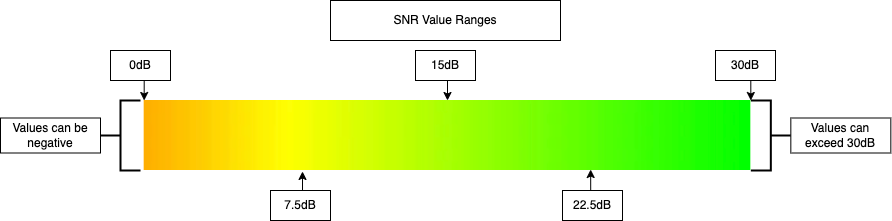
Note: Default values for an unknown signalToNoiseRatio will give the default value of -60.0
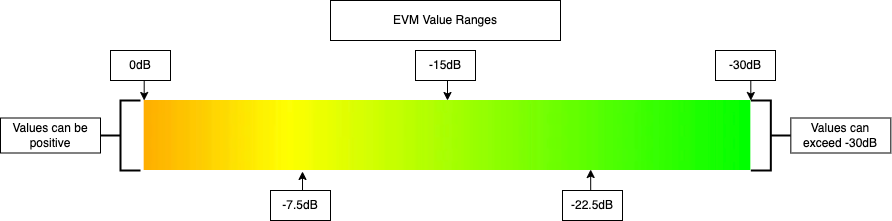
Note: Default values for an unknown signalToNoiseRatio will give the default value of 60.0
The Radius Sample Application provides a UI/UX indicator of overall signal strength and quality in the form of a circle in the bottom right corner of the application. The circle will grow larger in diameter as the signal strength improves and will change in color (follows same color scale as images on this page) as the quality improves. This is an example of how signal quality and strength values can be used to provide feedback to the users of your application containing the Radius SDK.
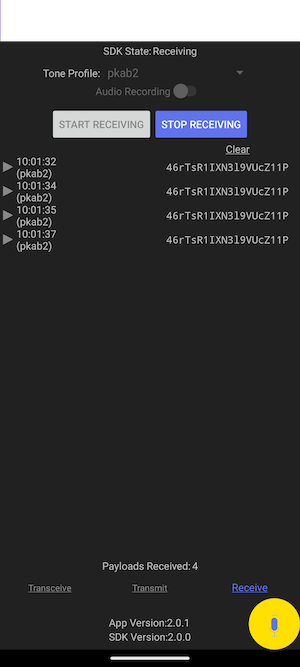
If you are experiencing either poor signal strength or quality, the following actions are recommended:
- Transmit at a higher volume.
- Reduce the distance between the transmitting speaker and the receiving microphone.
- Angle the transmitting speaker and receiving microphone towards each other and ensure there is nothing obstructing the line of sight.